Title: Biztalk
Send Email and Post Event logs
Author: Toraj
Khavari
Date: February
4, 2015
Objective: Solid
enterprise solutions have sustainable system life cycles with embedded
Productionability, Operationability, Maintainability, etc. I often refer to them
the “*ability.” Two major components to support *abilities are sending emails,
and posting events in the system event log. Email notification and system event
logs are great tools for system exceptions and error handling. Event logs can
be monitored and the system administrators can perform the initial root cause
analysis using the Event Viewers.
Biztalk
is the A-dec enterprise service bus. In this article we explore a design to use
Biztalk Orchestration to send email and post / log events.
Article Body:
1- Examine
the Event Log Application and Service. If you do not have a pool for your
application, create a pool using the following command.
New
-EventLog -LogName "<LogName>" -Source
"<Source>"
In this
article, we will use the following “LogName” and “Source.”
New
-EventLog -LogName "VendorsEDI" -Source "Adec"
2- Dynamic
Ports provides us XLANGs class libraries, which make the email / SMTP adaptors
more user-friendly.
Hint:
-
If
you wish to use none dynamic ports, that is very possible, too. In this
article, we will focus on dynamic ports.
-
Add
the following reference to your project.
Microsoft.XLANGs.BaseTypes
3- Create
an orchestration. Receive shape, followed by Construct Message, followed by
Send Shape, and inside the Construct Message insert a Message Assignment. The
orchestration should look as follows.
Hint:
-
Do
not be concerned about all the error messages and red (!) marks, we will deal
with them.
-
Set
Receive “Activities” to True.
-
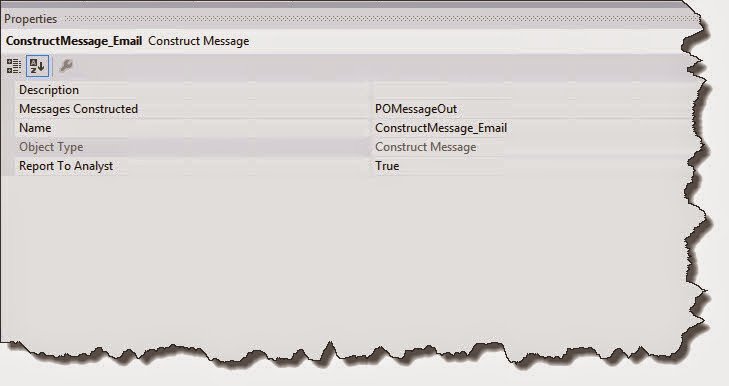
Complete
all the shapes properties. In my case they are as follows.
4- Create
Receive Port
I
already have one. You can create a new one.
Hint:
-
Add
the references needed to identify the Request Operation Message, Message Type.
In this article case it is, Adec.VendorsEDI.OutboundAdecSchema
5- Create
Send Port
There
is an existing one for this article. Feel free to create a new one.
Select
Port binding “Dynamic.”
Hint:
-
Add
the references needed to identify the Request Operation Message, Message Type.
In this article, for simplicity, it is the same as input schema, Adec.VendorsEDI.OutboundAdecSchema
6- Wire the
ports. Connect your Ports with the Receive and Send.
7- The
heart of this article is creating the email, logging a message, and sending the
email. To make it interesting, I included prompted values, extracted values,
and a few more items. Before getting started, setup a few references and
identify a few variables.
Add the following
references to your project
System.XML
System.Configuration
Navigate
to the Orchestration View TAB, Orchestration View, and expand the Messages
node. Add the following Messages
POMessageOut
– Message Type received schema, in this article is as follows.
Adec.VendorsEDI.OutboundAdecSchema.PurchaseRequisition_Purchase850
PurchaseOrderMsg
- Message Type send schema, in this article, for simplicity, is the same as
above.
Navigate
to the Orchestration View TAB, Orchestration View, and expand the Variables
node. Add the following variables.
emailMsgOut
– Type System.String
tempString–
Type System.String
OrderAccountStr
– Type System.String
PurchNameStr
- Type System.String
8- Construct
email. Create Email Message and Log Events. Double click “CreateEmail_MsgAssignment”
Message Assignment. Double click on the Message Assignment,
“CreateEmail_MsgAssignment”, in the Construct Message
Copy
and paste the following code in the Message Assignment and select apply. Change
the email address.
// Identify the email recipients. If
there are more than one, separate them with <;>.
// The best option is have email group.
tempString =
System.String.Format("mailto:{0}", "your.email@company.com");
WHOrchestrationDynamicSend(Microsoft.XLANGs.BaseTypes.Address)=tempString;
// Copy the inbound XML document
POMessageOut = PurchaseOrderMsg;
// Extract the Order Account. The Schema,
Node, Properties, and Instance XPath is the best place to get the Xpath.
// Remove the "Namespace" from
the XPath copied from "Instance XPath". Do not need it.
// The variables are System.String. The
Xpath require string to cast the extracted value.
OrderAccountStr = xpath(POMessageOut,
"string((/*[local-name()='PurchaseRequisition']/*[local-name()='VendPurchOrderJour']/*[local-name()='PurchTableAllVersions']/*[local-name()='OrderAccount'])[1])");
PurchNameStr = xpath(POMessageOut,
"string((/*[local-name()='PurchaseRequisition']/*[local-name()='VendPurchOrderJour']/*[local-name()='PurchTableAllVersions']/*[local-name()='PurchName'])[1])");
// Assign email subject.
tempString =
System.String.Format("Message from Vendors EDI Orchestration Server
{0}", "GBTDEVAXBTS02");
POMessageOut (SMTP.Subject)=tempString;
// Assign email body text character set.
It is very critical. Make sure it is setup correctly.
// Will cause you a lot of issue, if it
is not 100% right.
tempString =
System.String.Format("{0}", "utf-8");
POMessageOut
(SMTP.EmailBodyTextCharset)=tempString;
// Build the email body
emailMsgOut =
System.String.Format("VenderEDI Sender -");
emailMsgOut = emailMsgOut +
System.String.Format(" Identification Number: {0}" ,
PurchaseOrderMsg.SenderId);
emailMsgOut = emailMsgOut +
System.String.Format(" OrderAccount is: {0}" , OrderAccountStr);
emailMsgOut = emailMsgOut +
System.String.Format(" PurchName is: {0}" , PurchNameStr);
// Set the email boddy
POMessageOut
(SMTP.EmailBodyText)=emailMsgOut;
// Log event. For simplicity, let us log
the same message.
System.Diagnostics.EventLog.WriteEntry("VendorsEDI",
emailMsgOut);
Hint:
-
Minimize
whatever has a potential of change from any code. Place all the “tempString”
on the SSO Application or Biztalk Business Rule Engine (BRE). They are out of the
scope of this paper. For BRE Interface refer to “BizTalk using Business Rule
Engine Introduction” and for SSO Application refer to “SSO Application and its
use in BizTalk.”
9- Build
and Deploy the project
10- The
coding part of this application is completed. Biztalk provides SMTP Adaptors to
communicate with email servers. To configure SMTP adaptors we need a Host
Instance. I prefer to keep Host and Host Instances unique, as much as possible.
It will enable us to support *ability.
Configure
Hosts: Open Biztalk Admin Tool. Expand Biztalk Group > Hosts Node. Add a new
Hosts “Send.”
Create a
new “Send” Host Instance.
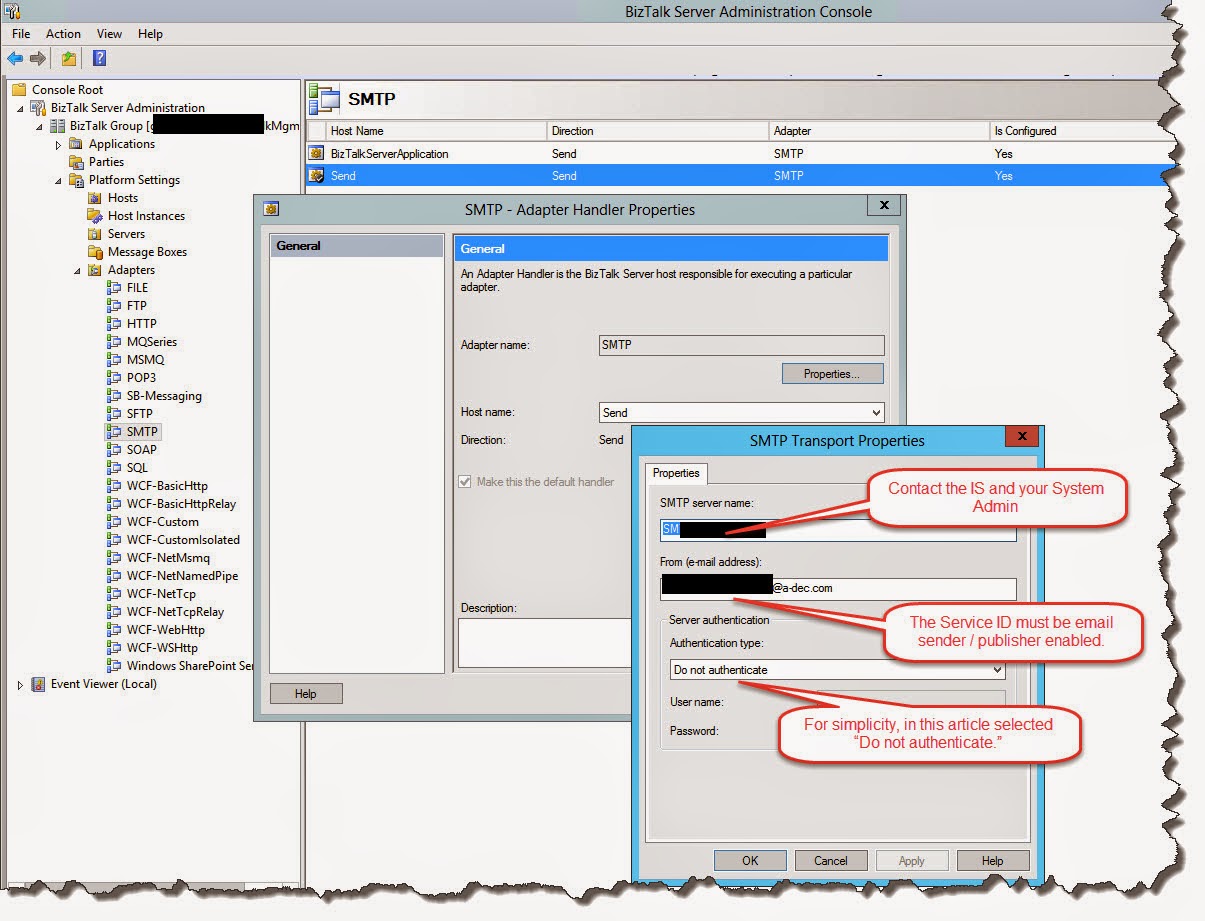
11- Configure
a new Send Handler for SMTP Adaptor.
12- Application
deployment configures the dynamic ports. Enlist and start it
13- Bind,
Enlist and start the orchestration.
14- Refresh
the Biztalk Group and Host Instances.
You
are done. Drop an XML in the Receive Port and watch your email. In this article
example the email looks as follows,
View
the event log. In this article example, the log is as follows.
The
potential for Biztalk emailing messages with out-of-box adaptors, logging
events, promoting schema node, extracting data from schema, etc. have
significant potentials to meet A-dec’s business needs, support *ability, error
handling, exception handing, and the list goes on.
Confucius
said, “Choose a job you love, and you will never work a day in your life.”
Enjoy
coding.
Cheers
Toraj
References:
-
The
Code for above example is in the A-dec TFS site as follows.
o
$/VendorsEDI/Adec.VendorsEDI/Adec.VendorsEDI.POOrchErrorHandling
Version
1.0.1405.01